


Shopable Reel
Case Study · WordPress Plugin 🇧🇩 Built in Bangladesh

Shopable Reel_

TikTok-style shoppable video reels for WooCommerce. Paste one YouTube link per product — the plugin builds a swipeable reel carousel, a full-screen immersive viewer, and a floating draggable video that follows shoppers inside the product gallery.

👤 Sazzad Hossain 👨‍💻 developersazzad 🧩 WordPress / WooCommerce ⚡ PHP · JS · AJAX 🏷 v1.5.0
0Reels Connected
0Views Tracked
0Shortcode Attrs
0Admin Screens
VASONTI reel
RUBAB reel
MUSKAN reel
FALAQ reel
ZAIRA reel
Shopable Reel full-screen viewer on phone
⚡ AJAX admin
▶ YouTube IFrame API
🧩 Elementor widget
🛍 WooCommerce
scroll
01 · Overview

A reel store inside WordPress

Shopable Reel brings the psychology of social video to a WooCommerce storefront — without subscriptions, without platform lock-in, without slowing the store down.

🎯 The Brief

Milanu, a Bangladeshi fashion label running WooCommerce on the WoodMart theme, sells movement — flowing dupattas, swinging kurtis — through still photographs. Shoppers arriving from Facebook & TikTok expected the same swipe-and-watch experience they get on social apps.

The paid options were wrong for the job: ReelUp lives on Shopify and charges monthly; Ecomm Reels covers WordPress but offers little design or per-product control. So I built a free, self-owned plugin that is easier than both: one YouTube link per product, and the whole shoppable-reel experience assembles itself.

Everything a merchant touches is AJAX-driven (no reloads), documented inside the admin (Shortcode & Help screen), and exposed twice: as a drag-and-drop Elementor widget and as a shortcode with 15+ optional attributes.

“If ReelUp can charge monthly for this on Shopify, WooCommerce merchants deserve something even easier — paste one YouTube link and the store starts selling in motion.” — Sazzad Hossain · developersazzad

📇 Project Facts

  • Project Shopable Reel — WordPress plugin, v1.5.0
  • Author Sazzad Hossain (developersazzad)
  • Role Solo full-stack: research → UX → code → ship
  • Client store Milanu · WooCommerce + WoodMart
  • Stack PHP · WP AJAX · JS ES6 · CSS3 · Elementor API · YouTube IFrame API · ACF
  • Admin UX Manage Reels · Settings · Shortcode & Help
  • Frontend Reel carousel · full-screen viewer · floating product video
  • Benchmarks ReelUp (Shopify) · Ecomm Reels (WP)
02 · Problem → Solution

Why still photos lose sales

✕ The Problem

  • 1Fabric needs motion. Drape, fall and shimmer of a three-piece never survive a JPEG grid.
  • 2Shoppers think in reels. Social apps trained them to swipe & watch — galleries feel like homework.
  • 3Paid walled gardens. ReelUp = Shopify-only subscription; Ecomm Reels = limited per-product & design control.
  • 4Video fear. Naive embeds wreck Core Web Vitals, so merchants avoid video entirely.

✓ The Shopable Reel Answer

  • ✓One-link setup. Paste a YouTube reel URL next to the product — or let an ACF field sync it automatically.
  • ✓Sells in 3 places. Home carousel → full-screen reel viewer → floating video on the product page.
  • ✓Merchant-grade admin. Three clean screens with stats, settings and built-in documentation.
  • ✓AJAX everywhere. Save, fetch and view-tracking round-trips with zero page reloads, nonce-secured.
  • ✓Performance budget. Conditional enqueues, lazy iframes, muted autoplay per browser policy.
03 · User Flow

From YouTube link to selling in motion

Four steps, zero code for the merchant. Every screenshot below is from the live plugin running on the Milanu store. Click any image to zoom.

01

Admin · Manage ReelsConnect a reel to a product

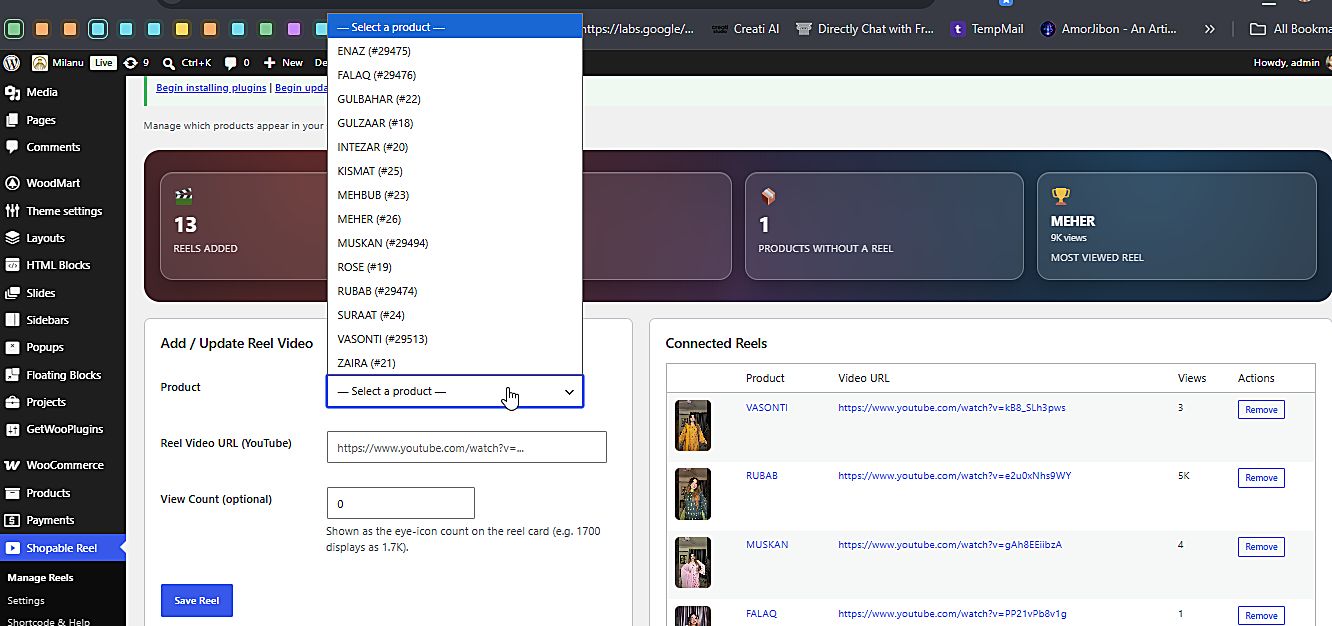
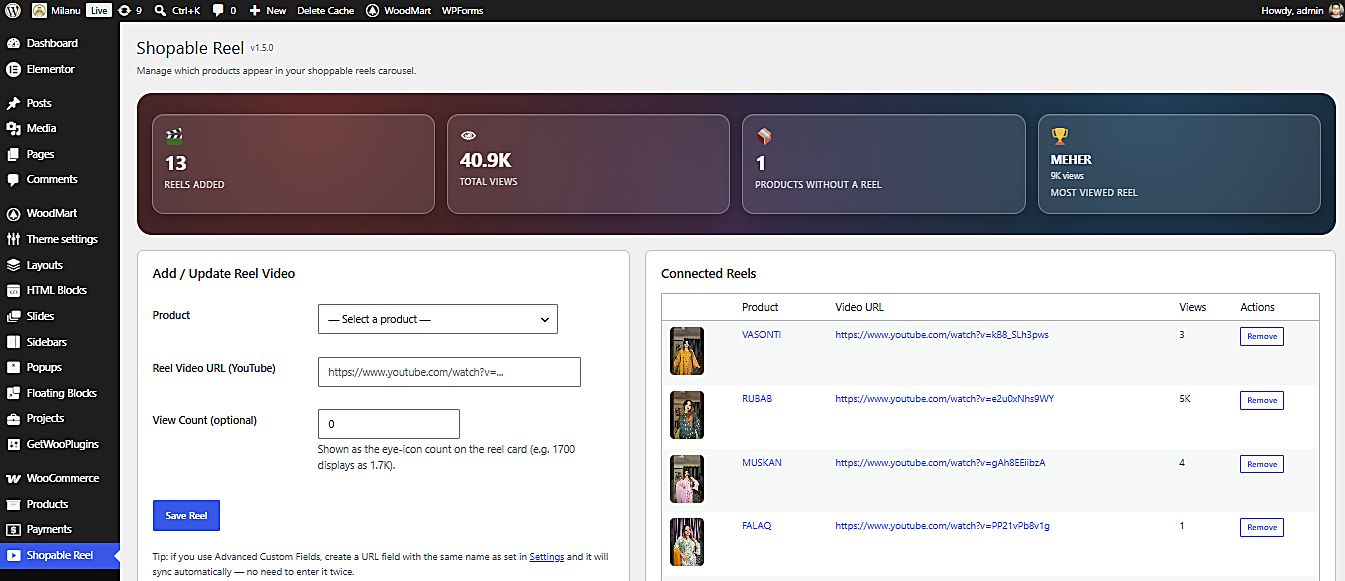
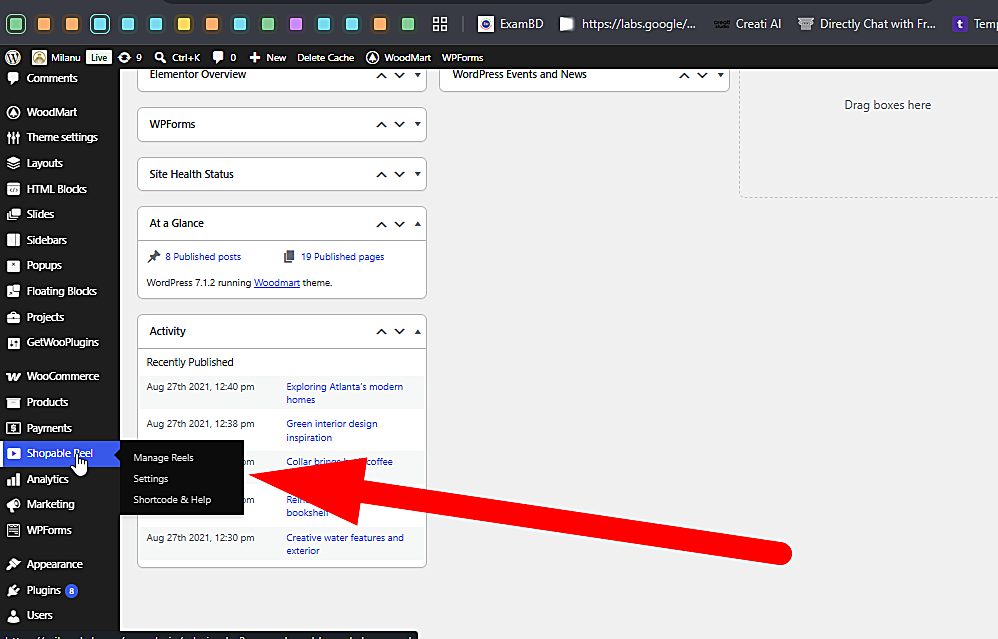
A new Shopable Reel menu lands in WP admin with three sub-screens. On Manage Reels the merchant picks any WooCommerce product from a dropdown, pastes the YouTube reel URL, optionally seeds a view count, and hits Save Reel — saved over AJAX, the connected-reels table updates in place. The stats strip tracks reels added, total views, products still missing a reel, and the most-viewed reel.
Admin Manage Reels admin dashboard
Manage Reels — stats strip + connected reels table, all actions over AJAX.
Admin⤢ Shopable Reel admin menu
WP admin — the plugin's three-screen home.
Admin⤢ Product selector dropdown
Product picker — any WC product, one dropdown.
02

Admin · Settings & DocsConfigure once, forget forever

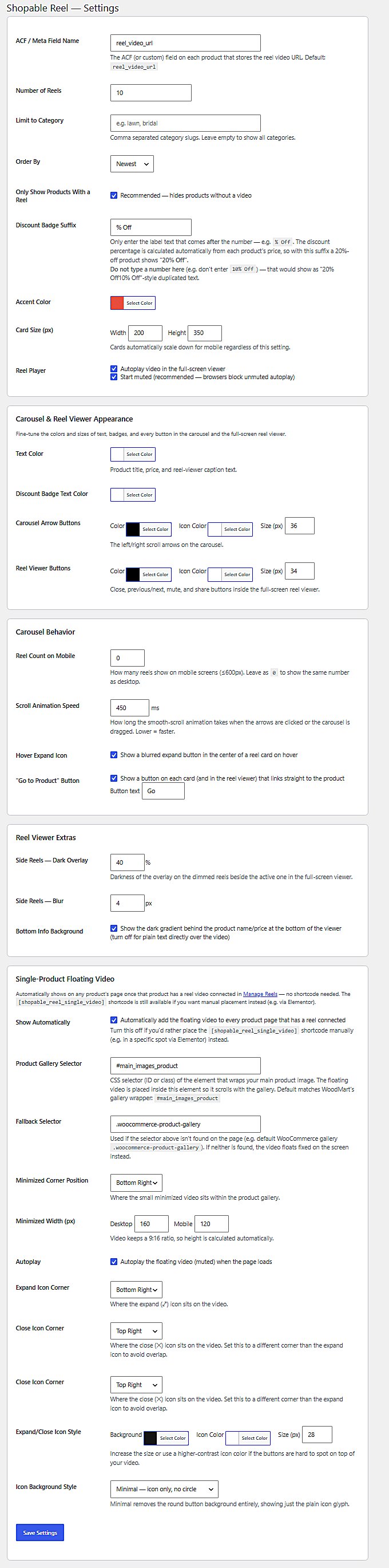
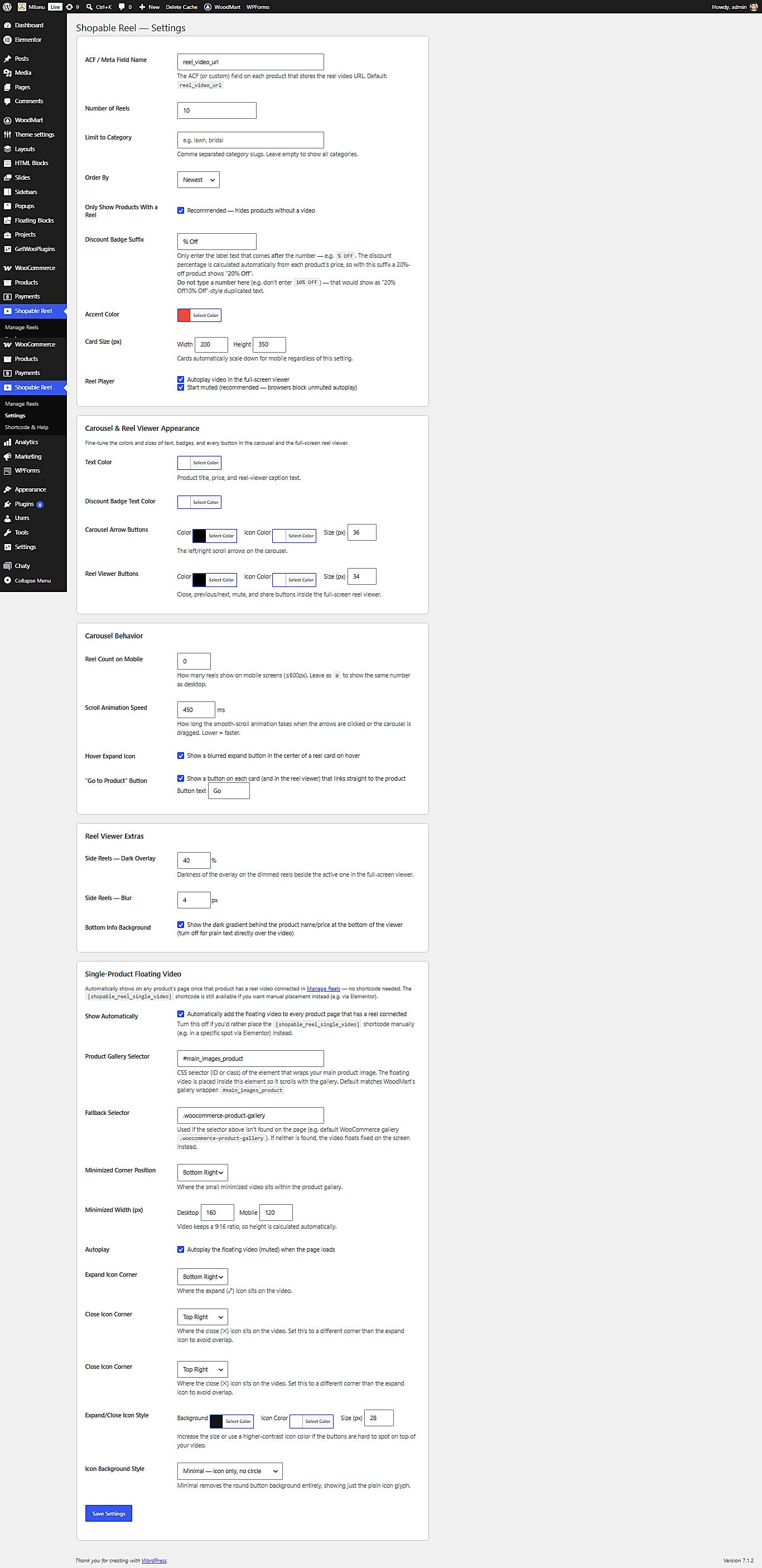
One Settings screen owns the whole design & behaviour system: query rules (count, category limit, order, hide reel-less products), the discount badge suffix with automatic percentage math (price 1990 → 1690 renders “-15%”), accent/text/arrow colours, card size, player rules (autoplay, start muted), viewer overlays (40% dim, 4px blur), mobile reel count, 450ms scroll speed, corner positions for the floating video — plus a Shortcode & Help screen that documents every attribute inside the admin itself.

Admin⤢ Plugin settings screen
Settings — 20+ merchant-facing controls, sane defaults.
Docs⤢ Shortcode and help screen
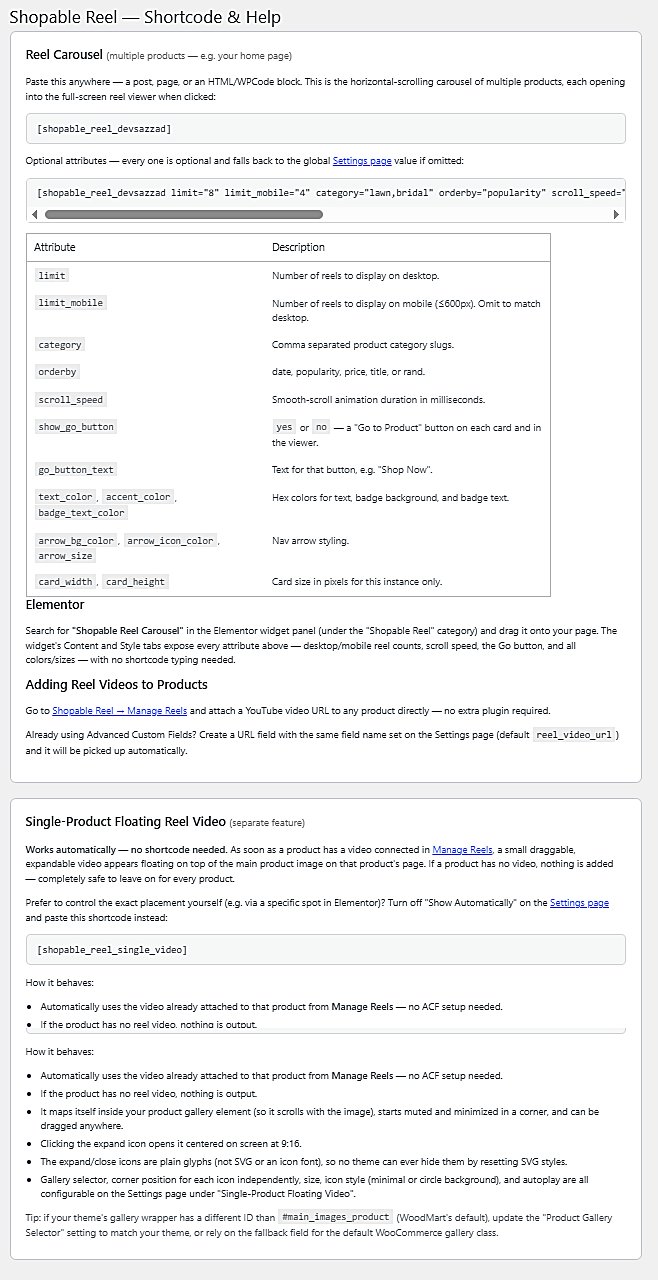
Shortcode & Help — docs that kill support tickets.
03

Publish · Elementor / ShortcodeDrop the carousel anywhere

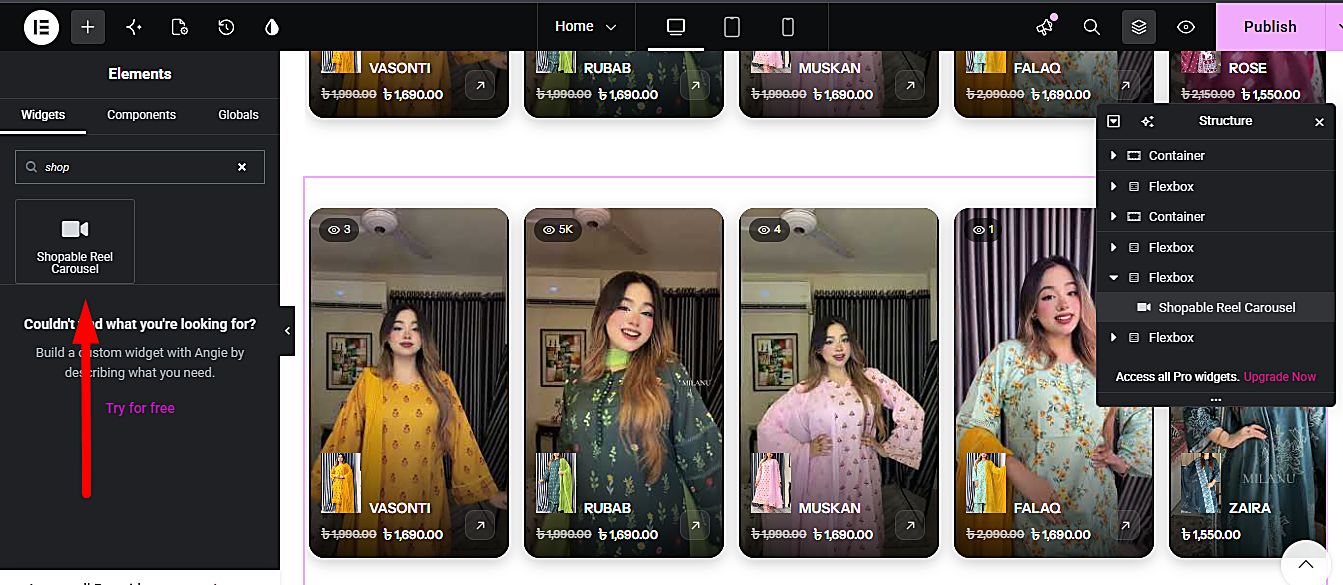
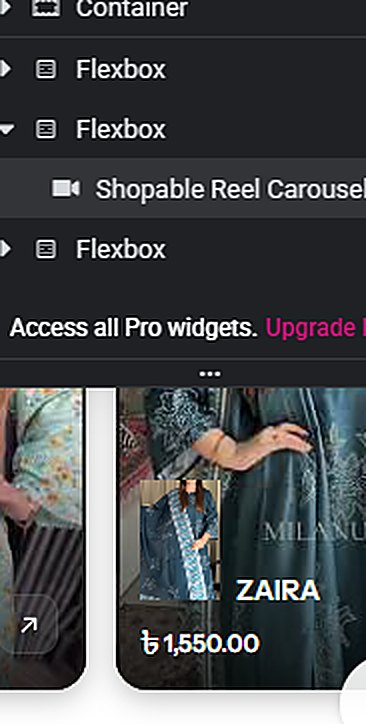
Search “Shopable Reel Carousel” in the Elementor widget panel and drag it onto any page — every setting above becomes a live widget control. Coders can instead paste [shopable_reel_devsazzad] with 15+ optional attributes (limit, category, orderby, scroll_speed, card_width, colours…). Omitted attributes fall back to Settings.

Builder⤢ Elementor widget with reel carousel
Elementor — widget panel + live canvas preview of the reel row.
04

Frontend · Shop in motionCarousel → viewer → floating video

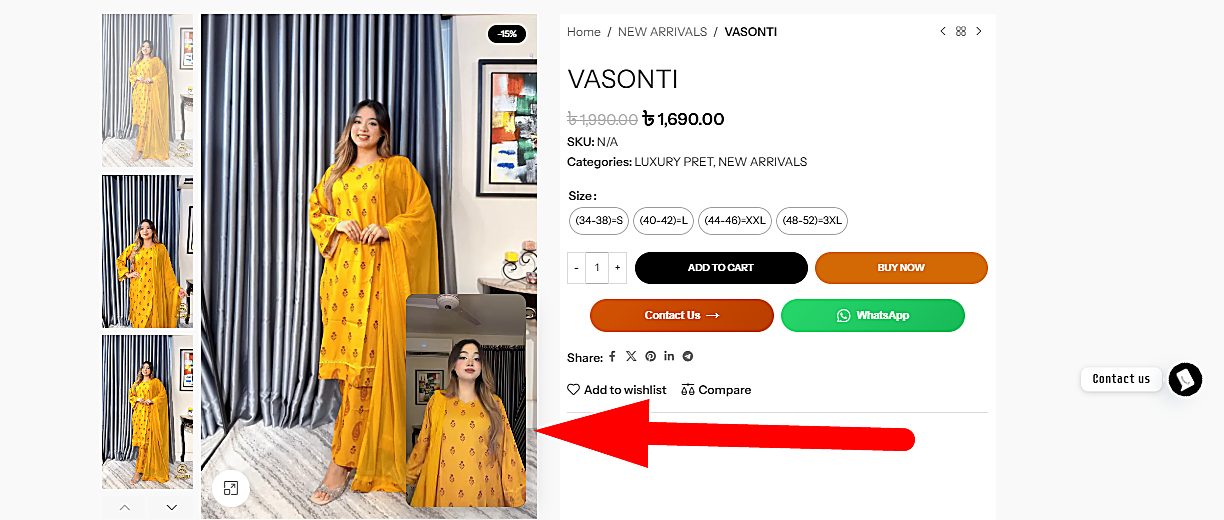
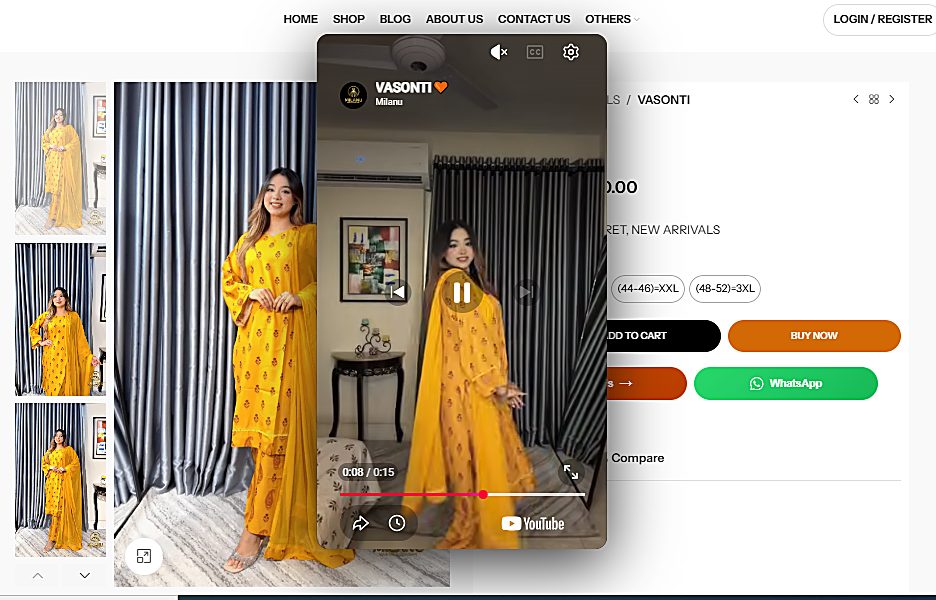
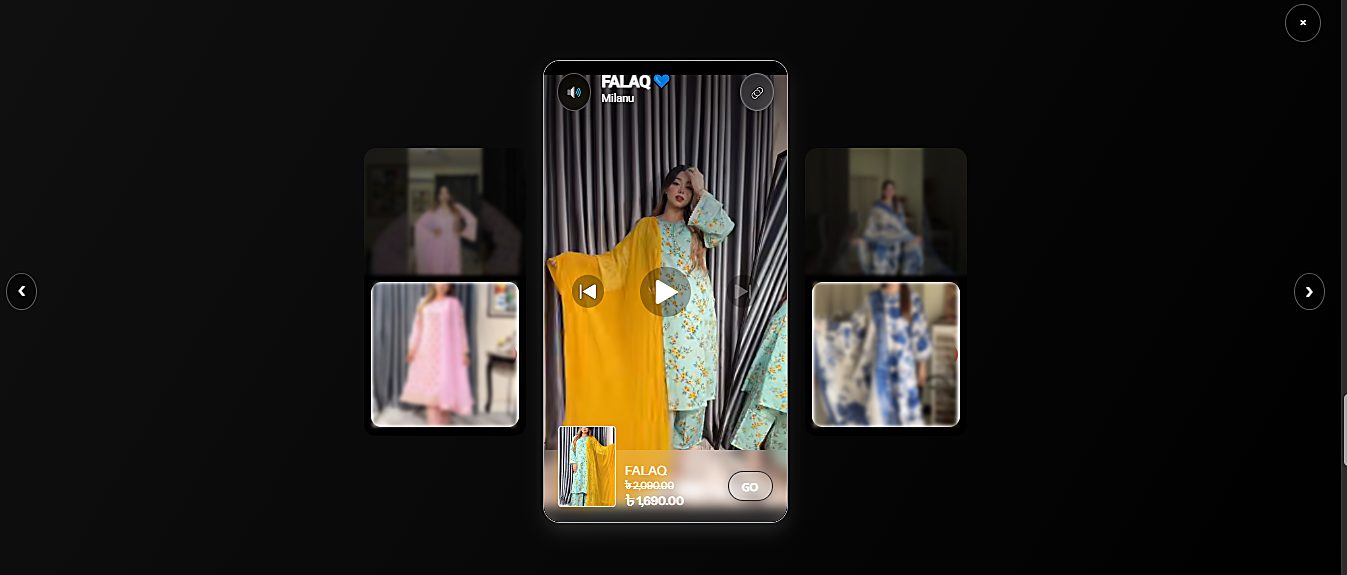
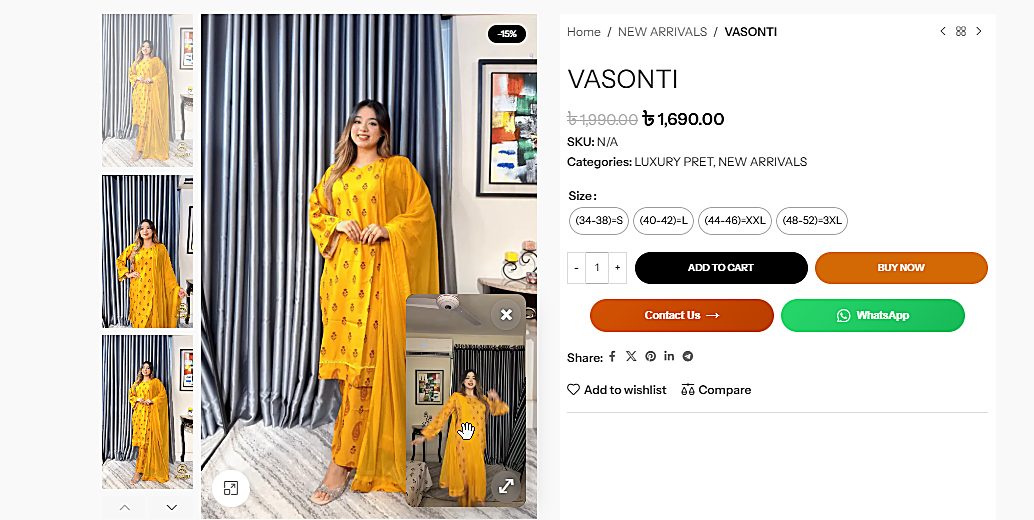
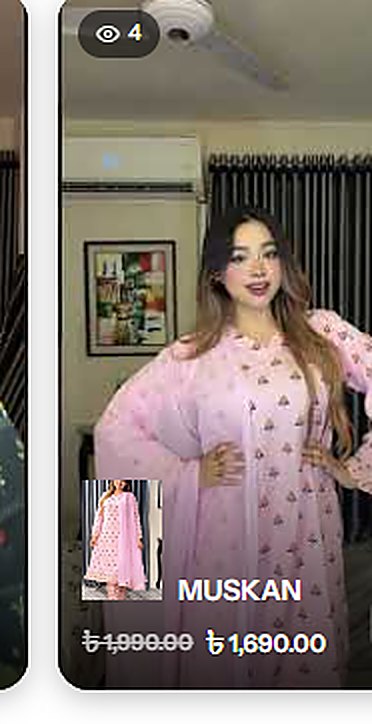
Visitors swipe a horizontal reel carousel (view-count badge, discount, price, product thumb). A tap opens the full-screen viewer: the active reel centered in 9:16 while neighbours sit dimmed and blurred beside it, with mute, copy-link, prev/next and a Go button straight to the product. On the product page itself, a floating draggable video hovers over the gallery image — minimized into a configurable corner, expandable to a centered 9:16 player. No video attached? Nothing renders.

Frontend⤢ Full-screen reel viewer
Full-screen viewer — the reel is the hero, the product is one tap away.
Frontend⤢ Floating video on product page
Product page — floating reel docked on the gallery.
Frontend⤢ Expanded floating video player
Expanded — centered 9:16 player, full YT controls.
04 · Feature Deep-Dive

Everything the paid apps do — and the things they don't

Admin
🎛️

Merchant-grade dashboard

Stats strip (reels, total views, missing reels, top reel) above a connected-reels table with thumbnails, URLs, view counts and one-click remove — every mutation over AJAX.

Data
🔗

Product ↔ video mapping

Bind any WooCommerce product to a YouTube reel from a dropdown — or create an ACF URL field named reel_video_url and let it sync automatically. Zero double-entry.

Frontend
📱

Full-screen reel viewer

9:16 stage with the active reel centered; neighbours dimmed (40%) and blurred (4px). Mute, copy-link, prev/next, brand header and a product chip with price + Go button.

Frontend
🎈

Floating product video

A draggable picture-in-picture reel inside the product gallery: minimized to a configurable corner, expandable to a centered player. Theme-safe via gallery selector + fallback class.

Builder
🧩

Native Elementor widget

“Shopable Reel Carousel” exposes every attribute as a widget control — counts, speed, colours, card size, Go button — with a live canvas preview. No shortcode typing for designers.

API
⌨️

Power shortcode

[shopable_reel_devsazzad] + 15+ optional attributes (limit, category, orderby, scroll_speed, colours, arrow & card sizing). Omit anything → Settings defaults apply.

UX
🎨

Design system in Settings

Text/badge/arrow/viewer colours, icon sizes, card dimensions, overlay dim & blur, scroll speed, hover-expand icon, Go-button text — plus auto-computed discount badges (“-15%”).

Data
📈

View analytics that mean something

Eye-badge counts formatted like social apps (1700 → 1.7K), counted once per session on real plays via YouTube player events — plus a “products without a reel” nudge list.

Core
⚡

AJAX core & performance budget

Nonce-secured admin-ajax endpoints for save/fetch/track; assets enqueued only where reels exist; iframes lazy-created on first open; muted autoplay respecting browser policy.

05 · Interactive Concept

Touch it — a vanilla-JS replica of the plugin frontend

Built for this case study with pure HTML/CSS/JS: drag or arrow through the carousel, then tap any reel to open the full-screen viewer concept (keyboard ← → works too).

🎠 Shopable Reel Carousel live concept

Real product data from the Milanu demo store · VASONTI · RUBAB · MUSKAN · FALAQ · ZAIRA

👆 tap a reel card to open the full-screen viewer concept
06 · Under the Hood

WordPress-native architecture, AJAX first

No custom tables, no framework bloat — post meta, options, nonces and the YouTube IFrame API, wired together with clean AJAX round-trips.

🛠️
WP Admin screensManage Reels · Settings · Shortcode & Help
▼ AJAX · nonce + sanitize ▼
⚙️
admin-ajax.php endpointssr_save_reel · sr_get_reels · sr_track_view
▼ update_post_meta / options ▼
🗃️
WooCommerce post meta_sr_video_url · _sr_views · sr_settings option
▼ render-time query ▼
🎠
Frontend rendershortcode + Elementor widget → carousel · viewer · floating video (YT IFrame API events loop back for view tracking)
includes/admin-ajax.php
// Save a reel — no page reload, nonce-secured, capability-checked
add_action( 'wp_ajax_sr_save_reel', 'sr_save_reel' );
function sr_save_reel() {
    check_ajax_referer( 'sr_nonce', 'nonce' );
    if ( ! current_user_can( 'manage_options' ) ) wp_send_json_error( 'forbidden', 403 );

    $product_id = absint( $_POST['product_id'] );
    $video_url  = esc_url_raw( wp_unslash( $_POST['video_url'] ) );
    $views      = absint( $_POST['views'] );

    update_post_meta( $product_id, '_sr_video_url', $video_url );
    update_post_meta( $product_id, '_sr_views',     $views );

    wp_send_json_success([
        'product_id' => $product_id,
        'video_id'   => sr_yt_id( $video_url ),      // watch?v=ID → ID
        'views'      => sr_format_views( $views ),  // 1700 → 1.7K
    ]);
}
assets/js/sr-frontend.js
// Count a view once per session — only when the reel actually plays
player.on( 'stateChange', ( state ) => {
  if ( state !== YT.PlayerState.PLAYING ) return;
  if ( sessionStorage.getItem( 'sr_viewed_' + reelId ) ) return;
  sessionStorage.setItem( 'sr_viewed_' + reelId, '1' );

  fetch( sr_ajax.url, {
    method: 'POST',
    headers: { 'Content-Type': 'application/x-www-form-urlencoded' },
    body: new URLSearchParams({
      action: 'sr_track_view', nonce: sr_ajax.nonce, reel: reelId
    }),
  })
  .then( r => r.json() )
  .then( res => badge.textContent = res.data.views ); // eye-badge updates live
});
includes/shortcode.php
// One shortcode, 15+ attrs — every one optional, falls back to Settings
add_shortcode( 'shopable_reel_devsazzad', 'sr_render_carousel' );
function sr_render_carousel( $atts ) {
    $a = shortcode_atts([
        'limit'          => sr_opt( 'count', 10 ),
        'limit_mobile'   => '',
        'category'       => '',
        'orderby'        => sr_opt( 'orderby', 'newest' ),
        'scroll_speed'   => 450,
        'show_go_button' => 'yes',
        'go_button_text' => 'Go',
        'text_color'     => '',  'accent_color' => '',
        'arrow_bg_color' => '',  'arrow_size'   => 36,
        'card_width'     => 200, 'card_height'  => 350,
    ], $atts, 'shopable_reel_devsazzad' );

    return sr_build_carousel( $a );  // server-rendered, zero-JS first paint
}

AJAX Round-Trip Simulator

// pick an endpoint and hit “Send Request” — // watch the exact conversation the plugin has with admin-ajax.php

🧠 Engineering Notes

  • Security nonces on every endpoint, capability checks, esc_* on both input & output
  • Storage post meta per product + one options row — upgrade-safe, no custom tables
  • Rendering server-side first paint; JS only enhances (viewer, floating video, tracking)
  • Video YouTube IFrame API created lazily on first open; muted autoplay per policy
  • Theming gallery selector + fallback class keeps the floating video theme-agnostic
  • i18n strings wrapped for translation; BDT-ready price formatting (৳)
07 · Competitive Landscape

Free, self-owned & easier than the paid apps

Benchmarked against the two references the project set out to beat — ReelUp (Shopify app store) and Ecomm Reels (wordpress.org). Scroll sideways on mobile.

CapabilityShopable Reel · v1.5.0ReelUp (Shopify)Ecomm Reels (WP)
PlatformWooCommerce / WordPressShopify onlyWordPress
PricingFree — self-owned codeMonthly subscriptionFreemium
Setup per productPaste 1 YouTube link · or ACF auto-syncApp install + plan + importManual mapping
Elementor widget✓ full controls + live preview✕✕
Full-screen reel viewer✓ dimmed + blurred side reels✓basic
Floating product-page video✓ draggable · minimize · expand 9:16✕✕
Admin analytics✓ views · top reel · missing-reel nudge✓limited
Design control✓ 20+ colours / sizes / speeds / cornerstheme-lockedfew
Mobile reel-count control✓✕✕
Shortcode attributes✓ 15+ with Settings fallbackn/afew
AJAX admin (no reloads)✓ nonce-secured✓partial
In-admin documentation✓ Shortcode & Help screenexternalexternal
08 · FAQ

Questions merchants ask — answered straight

The same answers live inside the plugin's Shortcode & Help screen. Looking for the Shopable Reel plugin? This is the official case study by its author, Sazzad Hossain (developersazzad).

What is the Shopable Reel plugin?
Shopable Reel is a free WordPress plugin by Sazzad Hossain (developersazzad) that turns YouTube reels into shoppable video carousels for WooCommerce: a swipeable reel row on any page, a full-screen immersive reel viewer, and a floating draggable video on each product page — all managed from one AJAX-powered admin screen.
Is Shopable Reel free? How does it compare to ReelUp?
Yes — free and self-owned, with no monthly subscription. ReelUp works only on Shopify and charges per month; Ecomm Reels covers WordPress but with limited design and per-product control. Shopable Reel adds an Elementor widget, a floating product-page video, 20+ design controls and mobile reel-count rules that neither paid alternative offers.
How do I add a reel video to a product?
Go to Shopable Reel → Manage Reels, pick the product, paste the YouTube reel URL and save — done, no code. Or create an Advanced Custom Fields URL field named reel_video_url and it syncs automatically without double entry.
Will video reels slow down my WooCommerce store?
No. Scripts and styles enqueue only on pages that render reels, YouTube iframes are created lazily on first open, autoplay starts muted per browser policy, and the carousel itself is server-rendered for a zero-JS first paint.
Where can I place the reel carousel?
Anywhere: paste the [shopable_reel_devsazzad] shortcode into a post, page or HTML block (15+ optional attributes), or drag the “Shopable Reel Carousel” widget inside Elementor — every setting is exposed as a live control.
Who built Shopable Reel, and how do I hire the developer?
Sazzad Hossain — @developersazzad, a full-stack web developer from Bangladesh. This case study documents the entire build. Visit the portfolio for more projects or to get in touch.
09 · Results & Learnings

Numbers from the live demo store

0Reels Connected
0Total Views Tracked
0Shortcode Attributes
0Settings Controls
🖥 3 admin screens 🧩 1 Elementor widget 🔄 0 page reloads in admin 📱 9:16 floating player 🏆 Top reel: MEHER · 5K views
11 · Reviews

What users say — add your own review

Used Shopable Reel, or explored this case study? Your feedback helps other WooCommerce merchants find the plugin. Drop a review below — it's published instantly.

5.0
★★★★★ 0 reviews
reviews publish instantly · saved in your browser

✍️ Write a review

Demo mode: reviews are stored locally in your browser (localStorage) — in the live WordPress build they persist via AJAX to the database, like everything else in this plugin.

SH

Designed & built by Sazzad Hossain

@developersazzad · Full-Stack Web Developer

Shopable Reel is a self-initiated product study: research, UX, WordPress architecture, frontend engineering and release — solo. If your store should sell in motion, let's talk.

WordPress PHPWooCommerceJavaScript ES6 AJAX / admin-ajaxElementor Widget API YouTube IFrame APICSS3 3DACF
⚡